AI Image Generators Compared: Midjourney vs Canva AI vs Others
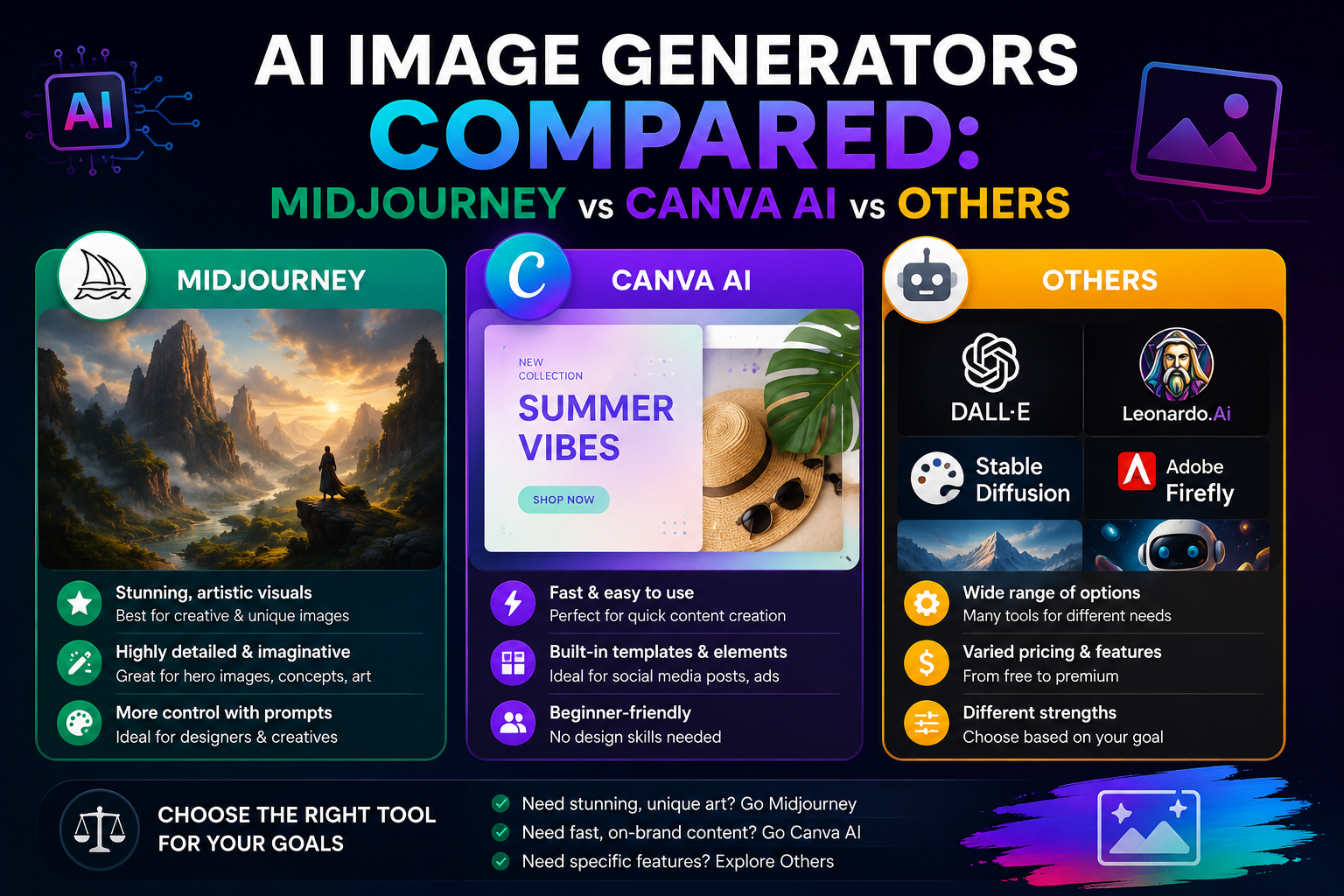
Midjourney is best for detailed, artistic visuals, while Canva AI works better for quick social media graphics with templates already built in. Most other AI image generators fall somewhere between these two depending on what you’re trying to make.
A freelance designer in Bangalore spent an entire afternoon once trying to recreate a client’s mood board by hand. She tried a couple of AI image generators out of frustration more than curiosity, and had three usable concepts ready in under twenty minutes.
This blog compares the major AI image generators available today so you can pick the one that actually fits your work, not just the one with the most hype.
What Are AI Image Generators?
AI image generators are tools that create images from text prompts using machine learning models trained on millions of pictures. You type a description, and the tool builds a visual based on it.
These tools are now used across very different fields, more than people usually expect:
- Marketing teams creating ad creatives
- Designers building mood boards and concepts
- Content creators making thumbnails for videos
- Businesses generating quick product mockups before a real shoot
Output quality still depends heavily on the tool and on how specific the prompt is.
How Does Midjourney Compare to Other AI Image Generators?
Midjourney stands out among AI image generators for its artistic detail and realistic lighting. It’s the tool most designers reach for when the final image needs to look painterly or cinematic.
A few things make it different from the rest. It runs through Discord, which takes some getting used to if you’ve never touched the app before. Image quality stays consistently sharper than most competitors, and it handles complex prompts with multiple subjects far better than it has any business doing. There’s also no free plan left, only paid tiers now.
If you’re after polished, gallery-style visuals, Midjourney usually gets there faster than tools built for quick edits.
How Does Canva AI Compare to Other AI Image Generators?
Canva AI is built more for speed and usability than artistic depth. It fits naturally into an existing design workflow rather than working as a standalone generator.
Where it tends to win:
- It builds images directly inside templates you’re already using
- Background removal and resizing happen in the same tab
- The free plan covers most small business needs without paying
- There’s far less of a learning curve than Midjourney
For someone running a small business page in a city like Pune or Indore, Canva AI usually saves more time than tools requiring complex prompts.
Which Other AI Image Generators Are Worth Knowing?
DALL-E and Adobe Firefly fill out the rest of the list, each leaning into a different strength.
DALL-E, built into ChatGPT, handles quick edits and variations well, and it’s particularly good at following literal instructions rather than interpreting them loosely. Adobe Firefly leans into commercial safety, since it trains only on licensed content, which matters for businesses that need to avoid copyright issues. For teams that need something more practical for campaign visuals, an AI poster maker can also help turn ideas into polished promotional designs without starting from a blank canvas.
Both sit in a middle ground between Midjourney’s artistic output and Canva AI’s template-driven simplicity.
How Do These AI Image Generators Compare on Price and Output?
Pricing and output quality vary quite a bit across these AI image generators, and the right pick often depends on budget more than features alone.
| Tool | Best For | Free Plan | Output Style |
| Midjourney | Artistic, detailed visuals | None | Painterly, cinematic |
| Canva AI | Quick social graphics | Yes | Clean, template-based |
| DALL-E | Literal prompt accuracy | Limited free use | Realistic, varied |
| Adobe Firefly | Commercial-safe content | Limited free use | Polished, safe for brands |
No single tool wins across every category here. The right choice really comes down to what the image is for and who’s going to see it.
Which AI Image Generator Should You Actually Choose?
Choose Midjourney if the image needs to look striking or artistic, and choose Canva AI if you need something fast that fits directly into social media tools for creating and publishing content.
For freelancers and agencies handling multiple client styles, it often makes sense to use both Midjourney for hero visuals and Canva AI for daily content. Smaller businesses without a design team usually do fine sticking with just Canva AI, while those needing a complete social media service can benefit from additional expert support.
If you want help building a consistent visual strategy across platforms instead of testing tools one by one, SocialThink works with businesses on exactly this kind of content planning.
Frequently Asked Questions
1. Are AI image generators free to use?
Some, like Canva AI, offer solid free plans, while Midjourney requires a paid subscription.
2. Which AI image generator is best for beginners?
Canva AI is the easiest to start with since it needs no prompt-writing skill.
3. Can AI image generators be used for commercial projects?
Yes, but Adobe Firefly is the safest choice since it trains only on licensed images.
4. Is Midjourney better than Canva AI for quality?
For artistic, detailed visuals, yes, but Canva AI is faster for everyday social media graphics.
5. Do AI image generators replace human designers?
They speed up early concepts, but most professional work still needs human refinement.