
TikTok Aspect Ratio Explained: 4 Things to Know For 2025
At Social Think, we provide businesses with the social media strategy, analytics, and insights they need to achieve real results. A huge part of a successful social media plan is making sure your content is perfectly suited for each platform.
For TikTok, one of the most important technical details is your video’s shape, officially known as the aspect ratio. Getting the TikTok aspect ratio right is a simple step that makes a massive difference in how your videos perform.
When your TikTok videos have the right dimensions, they look more professional and are more enjoyable for your target audience to watch.
This can lead to more views, longer watch times, and better engagement.
This guide will walk you through everything you need to know about the correct TikTok format. We will explain what the aspect ratio is, why it matters, and how to make sure your video content is always optimized for the best results on the platform.
Making sure your videos have the correct video aspect ratio is a foundational step for any creator or brand.
What is the TikTok Aspect Ratio?
Before we dive into the specifics for TikTok, it helps to know what a video aspect ratio is in general. This term might sound technical, but the idea is quite simple.
Understanding Aspect Ratios in Video
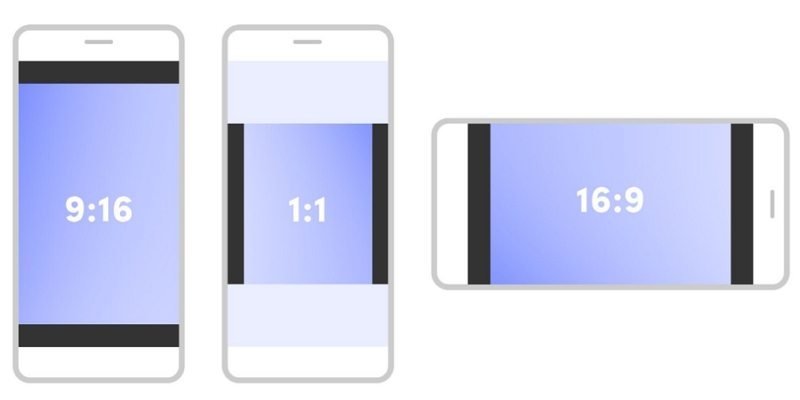
Think of an aspect ratio as the shape of a rectangle, described by its width compared to its height.
For example, the screen at a movie theater is a very wide rectangle. Your television at home likely has a 16:9 aspect ratio, meaning it is 16 units wide for every 9 units tall.
This creates horizontal videos. In the past, some social media platforms favored square videos with a 1:1 aspect ratio. There is a different aspect ratio for nearly every type of screen, and using the right one ensures your video fills the viewing area correctly.
The video format you choose should match the platform where you plan to share it.
The Official TikTok Aspect Ratio Explained
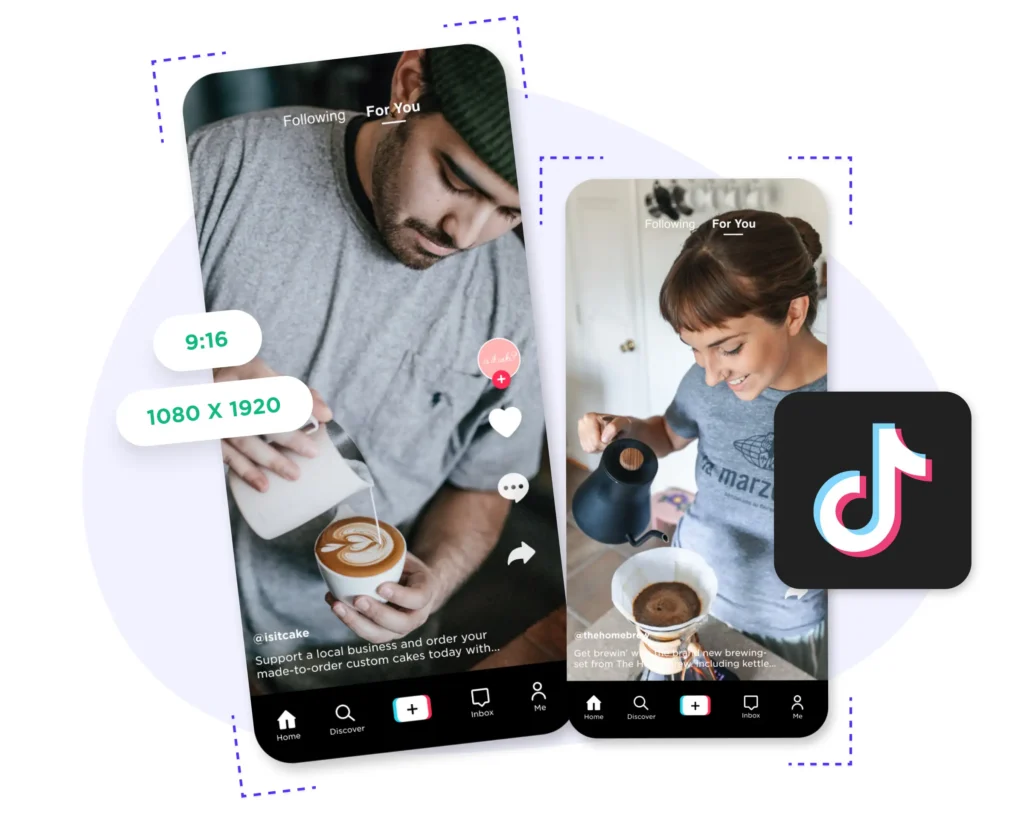
The official and ideal aspect ratio for TikTok is 9:16. This means the video is 9 units wide and 16 units tall.
This creates a tall, thin rectangle, which is a perfect vertical format. This shape is also called a portrait orientation, because it matches how you would hold a phone to take a portrait photo.
When content creators make videos in this specific TikTok format, they are creating portrait videos designed from the ground up for the app. This vertical aspect ratio is the standard for the platform, and sticking to it is one of the most important best practices you can follow.
Portrait Vs. Landscape: Why TikTok Prefers Vertical Video?
TikTok was built entirely for mobile devices. Think about how you naturally hold your phone; most of the time, it’s vertically. The 9:16 TikTok aspect ratio was chosen specifically because it fills the entire screen of a smartphone held in this position.
This creates a more captivating viewing experience for TikTok users.
When vertical videos take up the full screen, there are no distractions. You are completely focused on the video content.
In contrast, if you upload horizontal videos (like a 16:9 movie trailer) to TikTok, the app will display it with large black bars at the top and bottom to fill the empty space. This makes the video size feel small and looks unprofessional.
TikTok prefers the vertical format because it delivers the best viewing experience on the devices its audience uses. This focus on vertical viewing is also why other platforms like Instagram Reels and YouTube Shorts have adopted a similar format.
Why is the Correct TikTok Aspect Ratio Important For Your Content?

You might wonder if taking the time to get the TikTok aspect ratio right is worth the effort.
The answer is a definite yes. Using the correct video dimensions directly impacts your video’s performance and how your audience perceives your brand.
Maximizing Screen Real Estate For Full Immersion
The biggest benefit of using the 9:16 video aspect ratio is that it uses every inch of screen space available on a smartphone.
When your video content fills the entire screen, it grabs the viewer’s full attention. This full-screen presentation makes your content feel more immediate and immersive. For content creators, this is a powerful tool to hold a viewer’s interest from the first second to the last.
This uninterrupted vertical viewing helps your message stand out in a crowded feed and provides the highest quality experience.
Boosting Engagement and Watch Time
Videos that are properly formatted simply perform better. When a video looks clean, professional, and is easy to watch, TikTok users are more likely to watch it for a longer period.
This increases your average watch time, which is a key signal to the TikTok algorithm.
A longer watch time tells the algorithm that your content is valuable, prompting it to show your video to a wider audience.
Higher engagement rates, such as more likes and comments, often follow. So, using the correct aspect ratio isn’t just about looks; it’s a strategy to increase your reach and impact.
Avoiding Awkward Cropping and Black Bars
When you upload a video with a different aspect ratio, like a 1:1 square video or a 16:9 horizontal video, one of two things will happen. The app will either add black bars (or black borders) to the top and bottom or sides of your video to fill the 9:16 frame.
This shrinks your video and looks amateurish.
Alternatively, the TikTok app might try to automatically zoom in and crop your video to make it fit the full screen. This often results in important visual elements, text, or even people’s heads being cut out of the frame. Using the correct format from the start prevents these issues.
Ensuring Your Visuals Appear Professional
First impressions matter on social media. A video that has the right dimensions and high video quality instantly communicates professionalism. It shows your target audience that you are a serious creator or brand that pays attention to detail.
On the other hand, a poorly cropped video or one with black bars can make your content seem cheap or lazy. Adhering to the platform’s best practices, like using the ideal aspect ratio, helps build credibility and trust with your viewers.
The Best TikTok Aspect Ratio and Dimensions
Now that you know why it’s so important, let’s get into the exact specifications you need to create the perfect TikTok videos.
Following these guidelines will ensure your content looks its best.
The Ideal Aspect Ratio: 9:16
To be clear, the single most ideal aspect ratio for TikTok is 9:16.
This vertical format is the native shape of the platform and what its millions of users expect to see. Whether you are creating a regular post, a story, or a video ad, you should always aim for this video aspect ratio for the best results.
All your planning, filming, and editing should be done with this tall, vertical frame in mind.
Recommended Resolution: 1080×1920 Pixels
While the aspect ratio defines the shape, the resolution defines the detail and quality.
For the highest quality playback, your TikTok video dimensions should be 1080×1920 pixels.
This means your video is 1080 pixels wide and 1920 pixels tall. This is a standard high-definition video resolution that looks sharp and clear on most modern mobile devices.
While TikTok supports other resolutions, exporting your video file at 1080×1920 ensures the best video quality. Do not forget to check your frame rate settings too; 30 frames per second (fps) is a solid standard. Using these TikTok aspect ratio pixels is a key step.
Minimum and Maximum File Size Requirements
TikTok has limits on the video file size you can upload.
For iOS users, the maximum file size is 287.6 MB. For Android users, it is 72 MB.
If you are uploading from a desktop, the maximum file size is larger. These limits are in place to ensure videos can be uploaded and processed quickly.
If your video file is too large, you may need to compress it before uploading.
The video length also affects the file size; shorter videos naturally have a smaller video size. The maximum length for a TikTok video can change, but it is currently up to 10 minutes.
Supported Video Formats (MP4 and MOV)
TikTok supports several file types, but the two most common and recommended video format options are MP4 and MOV.
Most video editing software and cameras can export in these formats. The MP4 file format is generally the best choice for web video because it offers a good balance between video quality and file size.
When you export your final video, make sure the file format is set to one of these two options to avoid any upload issues.
How to Adjust Your Video For the Perfect TikTok Aspect Ratio?
If you have a video that wasn’t filmed in 9:16, do not worry. You can adjust it using various tools, from TikTok’s own editor to professional software. You do not always need a special TikTok aspect ratio converter.
Using TikTok’s In-App Editor
The easiest way to make quick adjustments is right within the TikTok app.
After you upload a video from your camera roll, you can tap the “Adjust clips” button. From there, you can pinch and zoom to resize your video within the 9:16 frame.
You can also rotate clips. This video editor is great for simple fixes, but it can lead to a loss in video quality if you have to zoom in too much.
It’s a useful tool for making sure your portrait videos are centered correctly.
Adjusting Aspect Ratio in CapCut
CapCut is a popular and free mobile video editor that is perfect for preparing content for TikTok. When you start a new project, you can choose the format before you even add your media.
Simply select the 9:16 option, and the editor will set up the correct canvas for you. You can then import your video and use your fingers to easily scale and reposition it to fit the vertical frame perfectly. This gives you more control than the in-app TikTok editor.
Formatting Videos in DaVinci Resolve
For more advanced video editing, DaVinci Resolve is a powerful tool.
To set the correct format, you should adjust your project settings before you start editing. Go to File > Project Settings.
In the Master Settings tab, change your Timeline Resolution to a custom setting of 1080×1920. This will set your entire project’s frame size to the vertical 9:16 aspect ratio. When you import footage, you can then scale and position it within this vertical frame.
Setting the Aspect Ratio in Adobe Premiere Pro
Adobe Premiere Pro is a professional video editing standard.
To set the correct TikTok aspect ratio Premiere Pro is quite simple. When creating a new sequence (File > New > Sequence), go to the “Settings” tab. Change the Editing Mode to “Custom.” Then, set the frame size to 1080 horizontal and 1920 vertical.
This creates a 9:16 timeline. You can then place your clips on this timeline and adjust their scale and position.
Premiere Pro also has a powerful “Auto Reframe” feature that uses AI to automatically reframe horizontal videos into vertical ones, which is very helpful when you want to repurpose content for multiple social media platforms.
Remember to check your export settings to ensure the final video file maintains these dimensions.
Common TikTok Aspect Ratio Mistakes and How to Fix Them?

Even if you know the rules, it’s easy to make mistakes. Here are some common problems content creators face with the TikTok video format and how to solve them.
Problem: Important Elements Are Cut Off
This often happens when you try to fit a wide video into a tall frame. You might film a great shot, but when you view it on TikTok, the user interface (UI) elements like your username, the caption, and the like/comment buttons cover up important parts of your video.
This is a very common issue for new TikTok users.
Problem: Ugly Black Bars On Your Video
If you upload a 16:9 horizontal video or even a 1:1 square video without resizing it, TikTok will add black bars to fill the 9:16 screen space. These black borders are distracting and make your video look like it does not belong on the platform.
It instantly signals to viewers that the content was not made for them, which can hurt your watch time.
Problem: Low-Quality Or Pixelated Uploads
Sometimes, even if the aspect ratio is correct, the video looks blurry or pixelated after you upload it.
This can happen if your original video resolution was too low (for example, 720p) and it was stretched to fit the 1080×1920 frame. It can also happen if your video file size was too large and TikTok overly compressed it, reducing the video quality.
Solution: Understanding the TikTok Safe Zone
The ultimate solution to most of these problems is to be aware of the “safe zone.”
The safe zone is the area in the center of the 9:16 frame where no UI elements will ever appear. All of your most important visuals, like faces, products, and on-screen text, should be kept within this central area.
The very top of the screen, the bottom quarter of the screen, and the far right side are where your profile photo, captions, and engagement buttons live. By keeping your key elements away from these edges, you ensure nothing gets hidden.
This is a fundamental part of good video editing for social media.
FAQ’s:
Can I Upload A 1:1 Square Video to TikTok?
Yes, you can upload 1:1 square videos to TikTok.
However, the app will automatically add black bars to the top and bottom of your video to make it fit the 9:16 vertical screen. It will not fill the entire screen and will not provide the immersive viewing experience that makes the platform so effective.
What Happens If I Upload A Horizontal (16:9) Video to TikTok?
If you upload a standard 16:9 horizontal video, it will appear very small in the center of the screen, with large black borders above and below it. This is not ideal, as it forces users to either watch a tiny video or turn their phone sideways, which most people will not do.
Your best option is to edit the video to fit the vertical format.
Does the TikTok Aspect Ratio Apply to Ads As Well?
Yes, absolutely.
For TikTok video ads, it is even more important to use the correct 9:16 vertical aspect ratio. You are paying for that screen space, so you want to use all of it. Full-screen, vertical ads are more engaging and have been shown to perform much better than ads in any other shape.
How Do I Keep Text and Captions From Being Hidden by the UI?
To prevent your text from being covered, always place it within the safe zone we discussed earlier.
As a general rule, avoid placing any text in the bottom 25% or the far right edge of the screen. Keep it centered both vertically and horizontally as much as possible to ensure it’s always readable.
Will TikTok Crop Or Alter My Video If the Aspect Ratio Is Wrong?
Sometimes, yes. If your video is close to the right dimensions, TikTok may try to automatically crop it to fit the 9:16 frame. This can lead to unexpected and undesirable results, like cutting off a person’s head or an important part of your product shot.
It’s always better to set the right dimensions yourself before uploading.
What’s the Best TikTok Aspect Ratio For Cover Images Or Thumbnails?
Your video’s cover image should also have a 9:16 aspect ratio with an image size of 1080×1920 pixels.
When users see your video in their feed, they will see this full-size cover. However, on your profile grid, TikTok shows a cropped, squarish center-cut of this cover. Therefore, make sure the most important visual element of your cover is in the dead center.
Conclusion
Mastering the TikTok aspect ratio is a simple yet powerful step toward improving your social media presence.
Ensuring your video is consistently produced in the 9:16 vertical aspect ratio at 1080×1920 pixel resolution means it will be fully optimized for the platform, presenting your brand professionally. This approach enhances available screen space and can lead to increased engagement and longer watch times.
Always remember to keep your most important visuals within the safe zone to avoid being blocked by the interface.
Creating great content for social media platforms involves more than just having a good idea; it requires a technical strategy as well. If you want to build a data-driven strategy to improve your social media results, the team at Social Think is here to help.
Contact us to learn how our analytics and insights can drive your business forward.